Overview
If you purchase the visual through Microsoft AppSource, licensing is managed entirely through the Microsoft 365 Admin Center. You do not receive a license key, and there is no manual license entry required in the visual.
How to Assign Licenses?
Step 1: Sign in to Microsoft 365 Admin Center
- Go to https://admin.microsoft.com
- Sign in using the purchaser’s/admin account
Step 2: Assign Licenses to Users
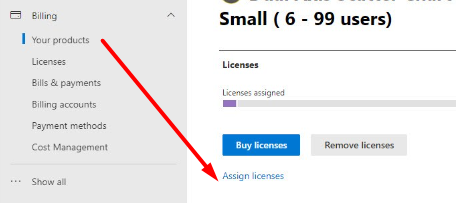
- In the left menu, navigate to Billing → Your products
- Select the purchased visual
- Click Assign licenses
- Assign licenses to the required users (or groups)
Step 3: Verify the Assignment
- Confirm that correct users are assigned
- Ask users to open/refresh their reports to pick up the license
Notes
- The purchaser automatically receives a license.
- License changes may take up to 1 hour to reflect.
- Users should refresh the report after assignment.
- You can assign licenses using existing Azure AD groups for easier management.
- For more information on Microsoft Power BI Licensing, click here.
If you still face issues after following these steps, please contact us.